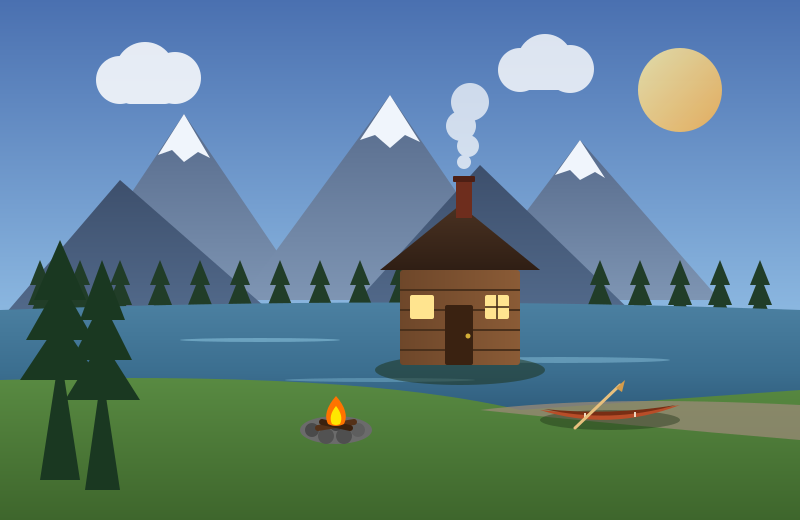
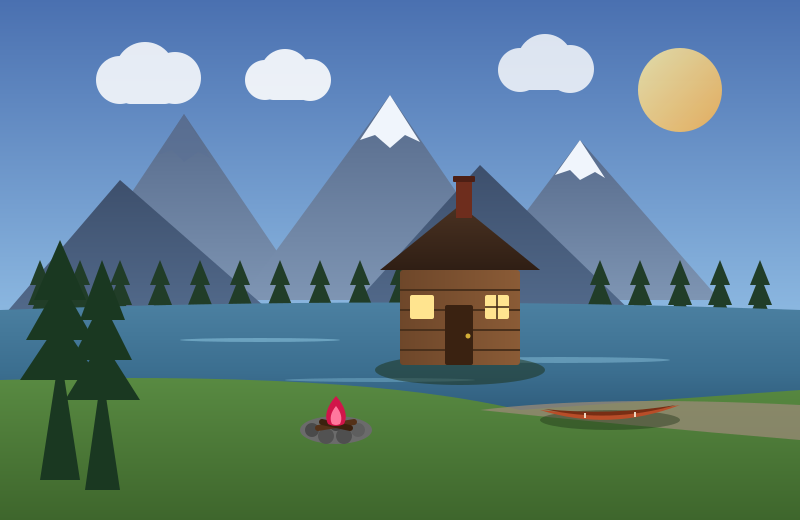
What Is Spot the Difference?
Spot the Difference is a classic visual perception puzzle where players compare two nearly identical pictures side by side to uncover subtle alterations made to one of them. While the overall scene, characters, and background look identical at first glance, several small elements have been intentionally tweaked—such as an item missing from a shelf, a color shifting from blue to yellow, or a tree branch pointing in a different direction.
In this digital version, you do not need paper or a pen. The game provides interactive touch-and-click detection, automatic marker highlights across both images simultaneously, real-time progress indicators, and helpful hints whenever you get stuck. Whether you have two minutes for a quick mental break or want to master complex Hard-level scenes, the game provides a calm, satisfying test of visual attention.
How to Play Step by Step
Getting started is quick and straightforward on desktop, tablet, or mobile:
- Choose a Difficulty Level: Use the tabs at the top of the game board to select Easy (5 differences), Medium (7 differences), or Hard (10 differences). Beginners can start with Easy to get accustomed to the mechanics before advancing to richer, more detailed illustrations.
- Study Picture A and Picture B Side by Side: Image A displays the original reference artwork, while Image B features subtle deliberate variations. Both images share identical dimensions, composition, and colors across the vast majority of the frame.
- Click or Tap Directly on Any Difference: You can click on either picture. When your cursor or finger touches an actual difference, the game locks a numbered green circle marker onto that exact coordinate on both pictures at the same time and plays a cheerful confirmation chime.
- Track Your Discovered Differences: The metrics bar at the top displays your current count (such as 3 / 5), while the progress dots below the images light up one by one as each discrepancy is uncovered.
- Clear the Level and Review Your Performance: Once you discover the final difference, a victory screen appears with your total completion time, number of hints used, mistakes made, and a star rating from one to three stars. From there, you can proceed to the next puzzle or replay the stage to beat your personal best time.
How to Identify Differences Between Two Images
Visual differences in well-designed puzzles are not placed randomly. They typically fall into five distinct categories that you can train your eyes to spot quickly:
- Missing or Extra Elements: An object present in one picture is entirely omitted in the other, such as a plume of chimney smoke, a fruit on a kitchen counter, or a bird in the sky.
- Color and Shading Shifts: An element keeps its exact shape but changes hue, brightness, or pattern, such as a striped umbrella turning solid or a coffee mug switching from blue to orange.
- Rotations and Positional Changes: An item tilts at a different angle, moves slightly higher or lower, or points in the opposite direction, like clock hands showing a different hour.
- Pattern and Texture Alterations: Surface details change, such as polka dots turning into chevrons or wooden floorboards displaying different grain lines.
- Quantity and Count Differences: A group of small repeated items changes in count, such as three flowers in a vase reduced to two, or four stars in the night sky instead of five.
Understanding Difficulty Levels
Every difficulty level on PuzzleFeels provides a tailored level of visual challenge and puzzle complexity:
| Difficulty Tier | Differences | Typical Solve Time | What to Expect |
|---|---|---|---|
| Easy | 5 Differences | 45s – 1m 30s | Prominent objects, bold color shifts, and clear omissions in the foreground. Great for beginners, children, or quick warm-ups. |
| Medium | 7 Differences | 1m 30s – 3m 00s | Richer backgrounds, moderate visual density, and smaller secondary props that require methodical scanning. |
| Hard | 10 Differences | 3m 00s – 6m 00s | Intricate illustrations with micro-variations tucked into distant scenery, architectural details, and complex patterns. |
You can browse different puzzles within any difficulty level at any time using the left and right navigation arrows next to the puzzle title.
Game Controls, Hints, and Helpful Features
The toolbar above the picture cards provides several handy utilities designed to make your session smooth and enjoyable:
- The Hint Button: When you cannot find the last tricky difference, clicking the amber Hint button displays an animated pulsing radar circle directly over the undiscovered area on both images. A brief hint message also appears in the notification bar describing what to look for, giving you just enough guidance without taking away the fun of solving it.
- Pause & Privacy Shield: Need to step away? Click Pause to freeze the timer. The puzzle images are temporarily hidden behind a blurred shield while paused so the clock remains an honest reflection of your active searching time.
- Restart: If you want a fresh start on the current puzzle, the Restart button clears all markers, resets the timer, and lets you tackle the level from scratch.
- Sound Toggle: You can enable or disable game sound effects at any time. The game remembers your preference automatically for future visits.
- Zoom Controls: When inspecting intricate artwork on high-resolution monitors or smaller laptop screens, use the built-in zoom popover to zoom in up to 150%, zoom out, or reset to fit the screen. Just like the zoom system introduced in our Norinori Game, zooming scales only the playable pictures so menus, headers, and buttons remain comfortably readable.
Practical Strategies to Find Hidden Differences Faster
Relying on random glances often leaves players frustrated when searching for the final one or two items. Using structured visual scanning habits makes finding differences far easier and faster:
1. The Systematic Quadrant Method
Divide both pictures mentally into four quadrants: top-left, top-right, bottom-left, and bottom-right. Focus entirely on one quadrant before shifting your gaze to the next. Solvers who enjoy systematic scanning often recognize this disciplined grid approach from puzzle games like Picross Game Online, where breaking large visual fields into orderly sections makes complex details manageable.
2. The Rapid Flicker Technique
Instead of staring deeply at one picture and trying to remember every detail, rapidly shift your eyes back and forth between the exact same spot on Picture A and Picture B. Your visual system is naturally wired to notice sudden motion or discrepancies. When you glance between the two images quickly, an altered detail will often seem to "jump" or flicker in your peripheral vision.
3. Follow Natural Lines and Horizons
Scan along continuous structural edges such as rooflines, fences, table edges, coastlines, and window frames. Artists frequently place small variations along prominent contours, such as a missing brick or an extra railing spoke, which become obvious when you trace the continuous line from end to end.
4. Check Foreground vs. Distant Background
Human vision naturally gravitates toward large, colorful foreground subjects like people, animals, or vehicles. Once you have checked those primary focal points, consciously shift your attention to the distant background: tree canopies, mountain silhouettes, cloud patterns, wall pictures, and far-off buildings where subtle variations are often nestled.
Common Mistakes to Avoid
Keep these frequent pitfalls in mind to keep your mistake count low and earn three-star completions:
- Frantic Guess-Clicking: Clicking randomly across the image when you feel stuck will quickly rack up mistakes on your score card and lower your star rating. If you truly cannot locate a difference after careful searching, it is much better to use the built-in Hint button than to guess blindly.
- Getting Stuck in Tunnel Vision: Spending two continuous minutes staring at the same corner of an image creates visual fatigue. When an area yields nothing, force your eyes to move to the opposite side of the screen and return to the challenging spot later.
- Ignoring Screen Zoom on Mobile: Trying to spot tiny details on a compact mobile screen without zooming strains your eyes. Take advantage of the zoom controls or switch the mobile view to focus comfortably on one picture at a time.
Playing Comfortably on Desktop and Mobile
Our Spot the Difference game is fully responsive and adjusts automatically to whatever device you prefer:
- On Desktop Computers: The wide landscape layout places Picture A and Picture B side by side at a generous scale. Use your mouse or trackpad for pinpoint clicking and take advantage of keyboard shortcuts or zoom to inspect high-density scenes.
- On Mobile Phones & Tablets: In portrait orientation, screen width is limited. The toolbar includes a convenient mobile view switcher with three modes: Both (shows both pictures stacked vertically), Pic A (focuses on the original image), and Pic B (focuses on the modified image). You can tap either view freely, and your markers remain perfectly synchronized across both pictures.
The Benefits of Visual Difference Puzzles for Concentration
Spot the Difference is celebrated by educators and cognitive scientists because it combines relaxing play with genuine mental stimulation. Comparing two complex scenes exercises visual working memory—requiring you to hold a mental picture of shapes and colors in your mind while scanning the adjacent artwork, much like the active visual recall practiced in our Memory Matching Game Online.
Furthermore, searching for minute discrepancies exercises sustained visual attention and fine visual discrimination. Regularly training your eyes to detect subtle changes sharpens visual processing speed, complementing the reflex training found in our Reaction Time Challenge. Most importantly, the quiet, focused nature of visual search provides a restorative mental break from stressful multitasking. Solvers looking for a balanced daily brain-training routine can explore our complete collection of free online puzzle games to enjoy logic, spatial, and memory challenges alongside their favorite difference puzzles.
Frequently Asked Questions
What is Spot the Difference?
Spot the Difference is a visual perception puzzle where players compare two nearly identical pictures side by side to find subtle intentional differences hidden between them, such as missing objects, color changes, or shifted details.
How do you play this online Spot the Difference game?
Choose a difficulty level and level stage, then inspect both pictures. Click or tap directly on any difference you spot on either image. Discovered differences are marked with synchronized numbered circles on both pictures. Find all differences to clear the stage and record your completion time!
Can I click or tap on either image to find differences?
Yes. Our detection system is bi-directional. You can tap or click on Picture A (original) or Picture B (modified). Correct spots are instantly highlighted on both images simultaneously.
How does the hint feature work?
If you get stuck, click the amber "Hint" button in the toolbar. A pulsing radar circle will appear over an undiscovered difference on both images, and a brief clue describing what to look for will appear in the notification bar.
Is this Spot the Difference game free to play?
Yes, 100% free with no registration, downloads, paywalls, or subscriptions. You can play directly in any modern desktop, tablet, or smartphone browser.
What is the difference between Easy, Medium, and Hard levels?
Easy puzzles contain 5 prominent differences suitable for beginners or quick relaxation. Medium puzzles feature 7 differences across more detailed scenes. Hard puzzles challenge you with 10 intricate, fine differences requiring patient observation.
How do the zoom controls work?
Click the Zoom icon in the toolbar to open the zoom popover. You can zoom in (+) up to 150%, zoom out (−), or click "Fit to Screen" (100%) to reset. Zooming scales only the playable pictures without enlarging navigation or text.
Can I play this game on a mobile phone or tablet?
Yes! The game is fully responsive for touchscreens. On smaller screens, use the mobile view toggle ("Both", "Pic A", "Pic B") in the toolbar to switch between stacked images or focus on one picture at a time.
Does the game save my progress and best completion times?
Yes. Your completed puzzles, best completion times, and sound settings are saved in your browser’s local storage so you can return anytime to improve your scores.
What happens if I click an incorrect spot?
An incorrect click displays a gentle fading ripple and increments your mistake counter. There is no time deduction or game-over penalty, so you can enjoy the puzzle at your own pace.
How are star ratings calculated at the end of each level?
Your star rating (1 to 3 stars) is based on your hints used and mistakes made. Finding all differences with 2 or fewer hints and 5 or fewer mistakes earns you a high star score on your victory card.